
The Callpicker module
Point Callpicker at the webhook and every call arrives as a record, matched to a contact, with its recording attached.
The Callpicker module brings phone calls into the same place as the conversations. A call finishes, Callpicker tells Sync Pro, and a call record appears against the contact who was on the line.
Connecting it
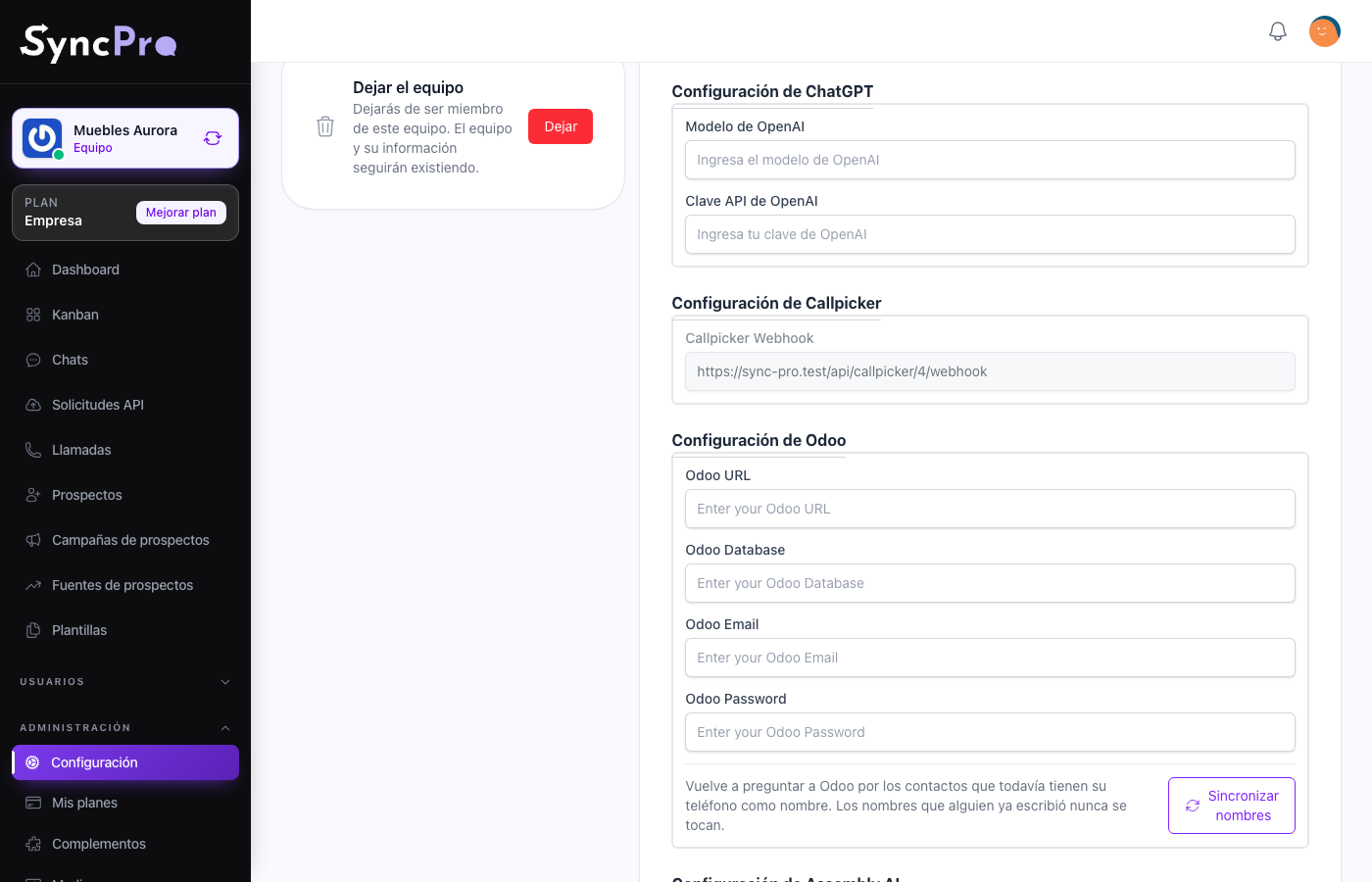
Settings → Integrations gains a Callpicker Configuration section when the module is on. It holds one read-only field, Callpicker Webhook: the webhook URL, which carries your team's id. Every member can open Settings, but only someone whose role has the Edit Settings permission sees the content of Integrations.
Copy that URL into Callpicker as the webhook for call events. There is nothing else to fill in on the Sync Pro side — the id in the URL is what tells Sync Pro which team a call belongs to.
Because the team id is in the address, do not reuse another team's webhook URL. Calls would land in the wrong workspace.
If the Callpicker module is off for your team, Sync Pro turns away the calls Callpicker sends to that address — it answers that the address does not exist — and keeps nothing of them, not even in the API requests log. Calls made while the module was off do not arrive later when you switch it on.
What happens when a call arrives
- The recording is downloaded and stored in the call's folder, inside the team's Calls folder, in Media. When Callpicker sends more than one recording for a call, only the first one is kept. If the download fails, the call is saved without a recording.
- The number is matched against the team's contacts, on the WhatsApp phone or the alternative phone.
- If no contact matches, one is created for the number so the call is never orphaned.
- The call is saved with its duration, its recording, the date, and whether it was inbound or outbound.
Calls are in Calls in the workspace, and each one is tied to the contact it belongs to, so a lead's history holds what was said on WhatsApp and what was said on the phone. The contact's conversation in Chats shows each call between the messages, at the moment it happened — see Chats and conversations.
If Callpicker sends the same call twice, what happens depends on Assembly AI: with it connected, the call is not created again; without it, the call appears twice.
Recordings use the team's space. When the team has run out of space, Sync Pro keeps no copy of the recording: the call is still recorded, it is still transcribed, and its recording plays from Callpicker for as long as Callpicker keeps it. See Your team's files and space.
Outbound calls and voicemail
For an outbound call, the number recorded is the one dialled. A short outbound call — under forty seconds — is stored with a duration of zero, on the assumption it reached voicemail rather than a person. It is still transcribed and analysed like any other call when those modules are connected, and the dashboard counts it among the short calls.
What it combines with
- With Odoo on, an unknown caller is looked up in your Odoo customers, so the contact is created with their real name instead of a bare number.
- With Assembly AI on, the recording is transcribed; with ChatGPT and Azure Language on as well, it is also analysed and summarised.
Neither is required. Callpicker on its own records the calls.