
Call transcription and sentiment
Assembly AI turns a call recording into text, Azure Language reads the mood of what was said, and ChatGPT links the two and summarises the call — what each one needs and what you see.
Two modules work on the recording of a call: Assembly AI and Azure Language. They are configured separately, and both need the Callpicker module to have something to work on: without a recording there is nothing to transcribe. They also need the ChatGPT module, because ChatGPT is the step that passes the transcript on and writes the summary.
Configuring them
Both sections are in Settings → Integrations. Every member can open Settings, but only someone whose role has the Edit Settings permission sees the content of Integrations.
Assembly AI Configuration has one field, Assembly AI Api Key: the API key from your Assembly AI account.
Azure Language Configuration has two fields, and both are required:
| Field | What to put in it |
|---|---|
| Azure Language Endpoint | The endpoint of your Azure Language resource. |
| Azure Language Api Key | A key for that resource. |
Press Save at the end of the page. A saved key is never shown again: the field reads Current value: followed by its last four characters, and Change opens it to type a new one.
What happens to a call
Each step waits for the one before it, and each needs its own module connected:
- Assembly AI. Every call that arrives with a recording is sent to Assembly AI as soon as it arrives. Sync Pro asks for the speakers separated, expecting two people, with language detection, punctuation and a short summary. It then checks every minute until the text is ready.
- ChatGPT connected. Sync Pro takes the turns of the conversation from the Assembly AI result and keeps them on the call as they came. Nothing is sent to OpenAI in this step, but it only runs when the ChatGPT module is connected.
- Azure Language. Consecutive turns from the same speaker are merged, and the text is read for sentiment in batches, always as Spanish.
- ChatGPT again. The model reads the transcript and writes the call's summary.
Where the chain stops depends on what is connected:
- Without Assembly AI, the call is recorded and nothing else happens.
- Without ChatGPT, the call is sent to Assembly AI, but nothing you can see comes back: no transcript, no sentiment and no summary.
- Without Azure Language, the chain stops after step 2: still nothing you can see.
- With all three, the call gets its transcript, its sentiment and its summary.
A call that Callpicker reports as lasting zero seconds is still sent to Assembly AI, but Sync Pro never collects its result, so it goes no further. A call that arrives without a recording is not sent at all.
Transcription is not instant. The call appears first, and the results follow as each step finishes.
Reading the result
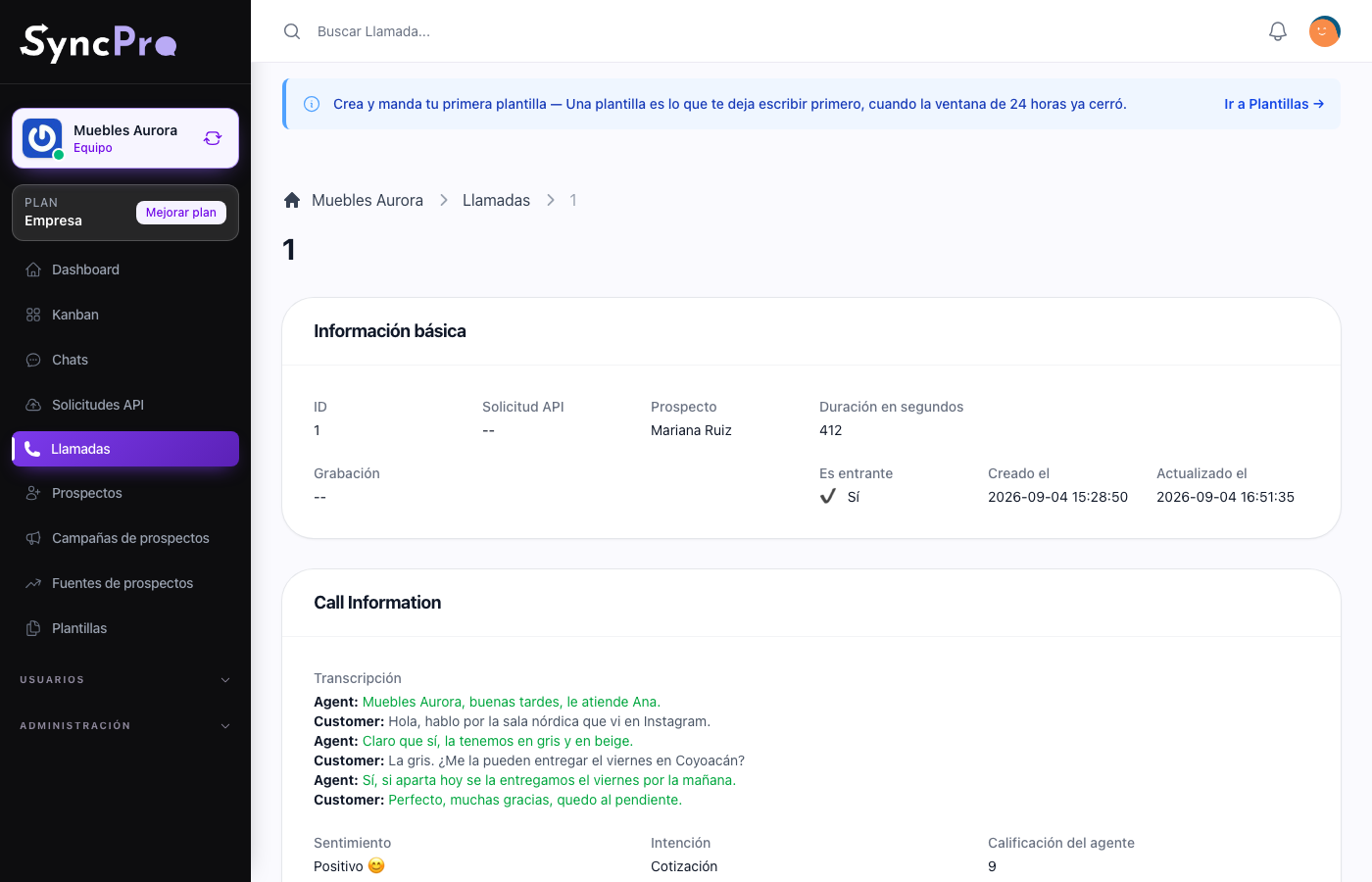
Open the call from Calls, or with View call on the call in the contact's conversation in Chats. Its page shows:
| Field | What it holds |
|---|---|
| Transcription | The text of the call, turn by turn, each sentence coloured by its sentiment: green for positive, red for negative, grey for neutral. The turns are labelled Agent and Customer in alternation, always starting with Agent. |
| Sentiment | How the customer felt, as ChatGPT read it. It is shown in Spanish: Positivo, Neutral or Negativo. |
| Intent | What the call was for, as one Spanish word: venta, pregunta, soporte, proveedores, reclamo, extorsion or otro. |
| Agent Score | The agent's performance, from 0 to 10. |
| Call Summary | A summary of the whole call. |
| Agent Performance | What the agent did well or badly. |
| Notes | Anything else the model noted. |
The Transcription comes from Azure Language; Sentiment, Intent, the score and the summaries come from ChatGPT. The same readings feed the calls panel on your dashboard. See Your dashboard.
Costs
Each key is billed to your own Assembly AI, Azure and OpenAI accounts. Every recorded call is sent to Assembly AI, and with the chain complete it also goes to Azure Language and once to OpenAI. A team that records a lot of calls should switch these on knowing that.